WHAT IT DOES
The whole clinic workflow, in one system
From a new patient’s first call or form, to the appointment, the record and the odontogram, to treatments, and on to the money, the card payment and the legal receipt in myDATA.
Below is everything that exists today, with an honest marker on each. Where something is not ready yet, we say so.
How to read the markers
We use the same four markers everywhere. Where something is not ready yet, we say so.
Running today, in production, in real clinics.
Designed or in development; not active yet.
Only for clinics working in orthodontic mode.
Patients & the clinical record
The record is structured data — things that can be searched, summed and linked to each other — not free-text notes nobody can find again.
Patient card
Demographics including the Greek social-security number (ΑΜΚΑ), search by name or phone, and sections that open without losing your place. The top of the card gathers the structured medical history that has been entered.
AvailableStructured medical history
Medical and dental history and allergies are recorded as structured fields, not as one free-text box. That way the summary at the top of the card follows from the fields themselves, without anyone having to compose it separately.
AvailablePatient family
Parent, child, spouse or sibling links; suggested relatives from a shared phone number or father’s name; a separate contact person and payer; and a combined family balance.
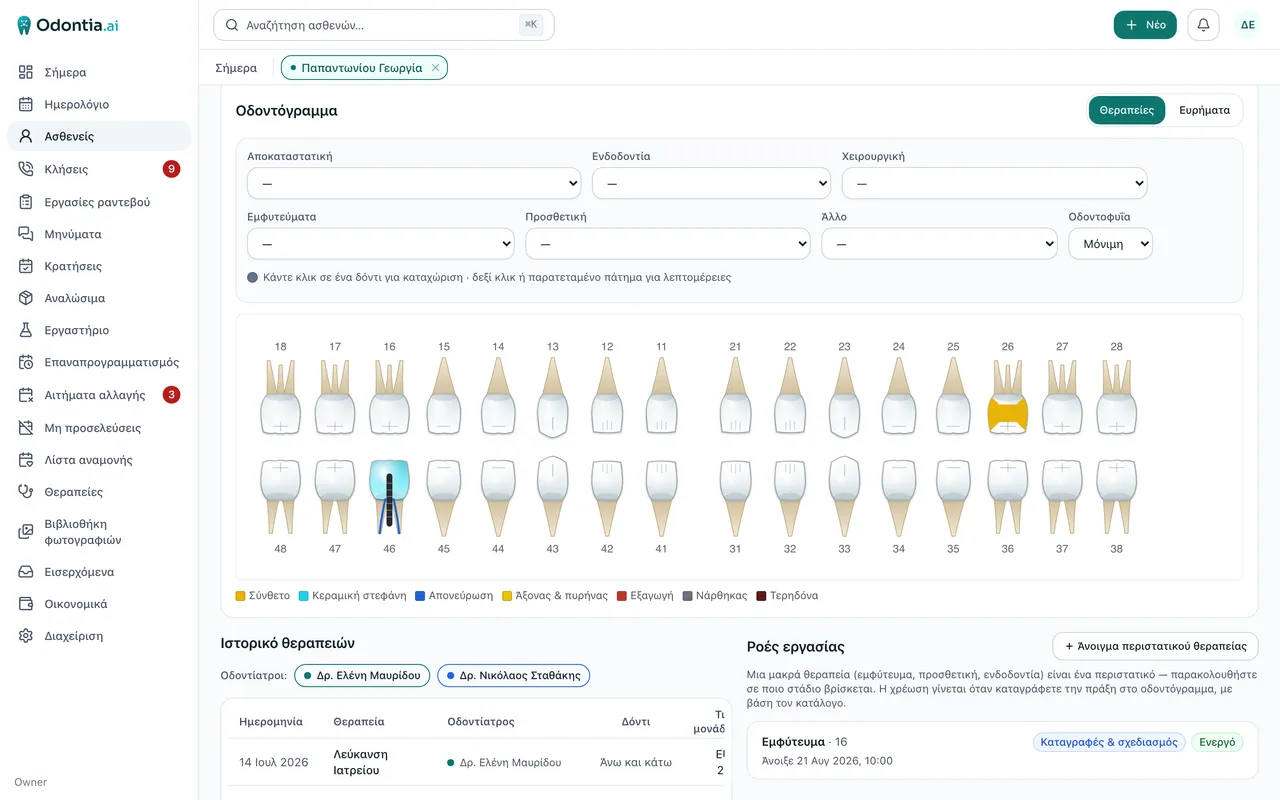
AvailableOdontogram
An interactive tooth map (FDI) with charting per tooth and per surface. Structured data, searchable and linked to treatment and cost — not a drawing nobody can query. No computed indices and no diagnosis.
AvailableTreatment recording
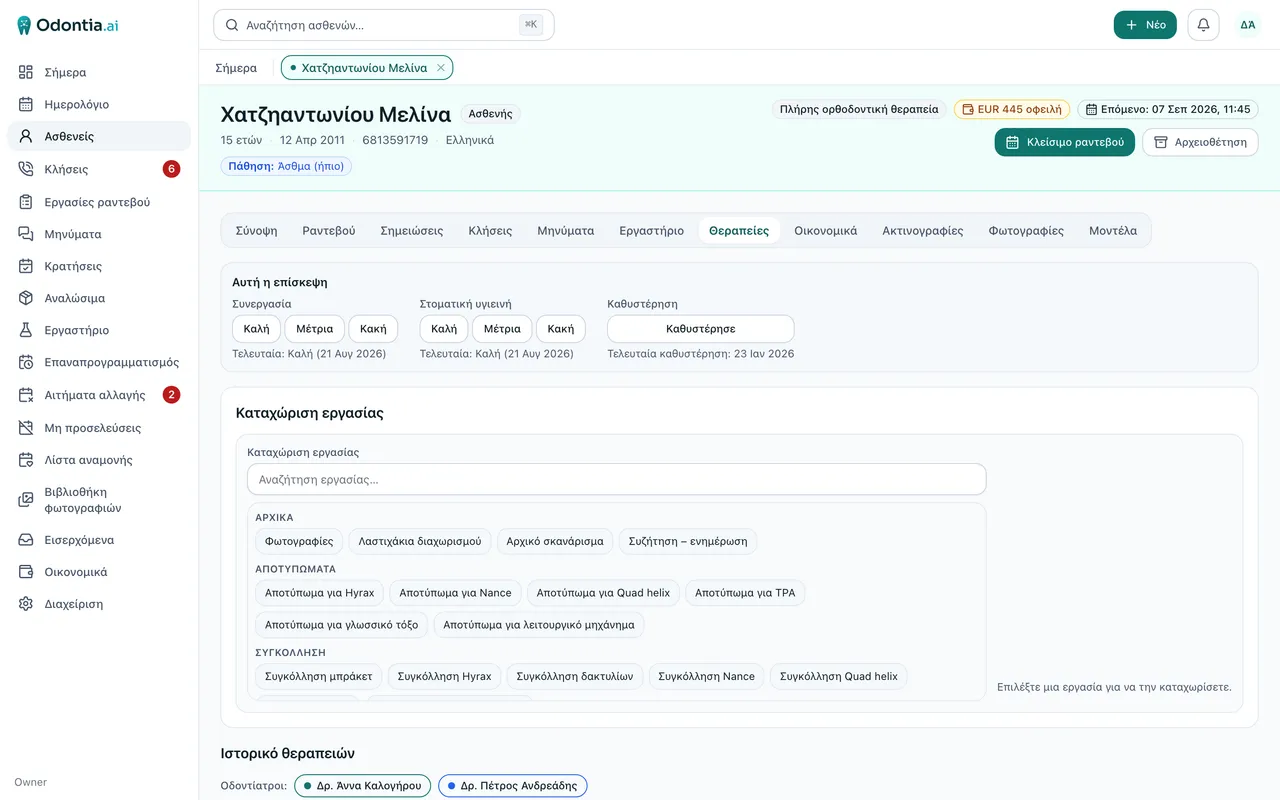
The source of truth for every performed procedure: price, date, dentist, arch (upper, lower or both). What goes in here is what gets charged and what gets measured.
AvailableTreatment plans
The dentist writes the plan. Odontia keeps it per patient with stages and cost, and produces a printable quote for the patient to take home.
AvailableCase tracking
Long treatments — implant, prosthetics, endodontics — live as one case with stages, instead of scattered entries nobody connects months later.
AvailableImplants — planning & stock
A list of implants to be placed, a catalog of systems and dimensions, and light stock counting — as much as a practice needs, not a warehouse system.
AvailableOrthodontic catalog
An orthodontic procedure catalog organised by treatment stage, with aligner brands and headgear types. In orthodontic mode the odontogram, plans, cases and implants step off the screen.
OrthodonticFast charting screen
One searchable list of the procedures the practice actually uses, with upper and lower arch buttons — so a visit is recorded in a few taps instead of hunting through the whole catalog. Shipped September 2026.
OrthodonticAppointments & patient flow
The calendar is one part. The other is everything hanging around it: who asked to move, who did not show, who is waiting for a cancellation, who called and got no answer.
Calendar
Day, week or month view, colour by dentist or appointment type, and drag to move an appointment.
AvailableSeveral practices — one business, several locations
Every appointment knows where it happens, every patient has a home practice, the statistics split per practice, and the receipt is issued at the right establishment. Opening a second practice does not mean a second system.
AvailableYour appointments in Google, Apple or Outlook
Each dentist switches their own sync on from their account, copies a link and pastes it once into the calendar they already look at. From then on their own appointments — across every practice — show up there and keep themselves up to date. The flow goes one way: from Odontia into your calendar. Appointments are always booked and moved inside Odontia.
AvailableAppointment work
The five queues around appointments — calls to handle, change requests, no-shows, the waiting list, new times — read as one list in sections, not as five screens.
AvailableLeads & conversion
Prospective patients who exist only as a name and a phone number, one-click conversion into a patient, and a safety net for the ones who slipped away.
AvailablePublic intake form
The patient fills in details, history, consents and a signature from their phone, in four languages — Greek, English, German, French. From a QR code at the desk, or on an address of your own carrying your own logo. What the patient sends is not written into the record: it arrives as a Proposal and a person approves it.
AvailableThe form changes with the practice
It is not one form for everybody. A general dental practice and an orthodontic practice see different questions, because they do not need the same ones. The practice’s mode decides — declared once and true everywhere; not a setting somebody fills in per form.
AvailableOrthodontic intake form
In orthodontic mode the form asks the seven things an orthodontist asks: which dentist or paediatric dentist referred the patient, injuries to the jaws and teeth, grinding or clenching, surgery to the face or jaws, allergies, medication, other medical problems. The general practice’s long condition checklist, smoking, alcohol and the insurance fields are not shown. Built and deployed to production; no patient has filled one in yet.
OrthodonticWhen a parent fills it in for a child
Parent or guardian details, with a separate person to contact — and the whole document changes voice: the notices and the declaration speak about the patient and about the parent, rather than about the signer as if they were the patient.
AvailableSelf-booking
Instead of telephone ping-pong, you send a link with specific times you chose; the patient taps one and the appointment is booked, with protection against double-booking.
AvailableOpening hours per practice
Each practice with its own hours, so the calendar and online booking never offer a closed slot.
ComingMoney
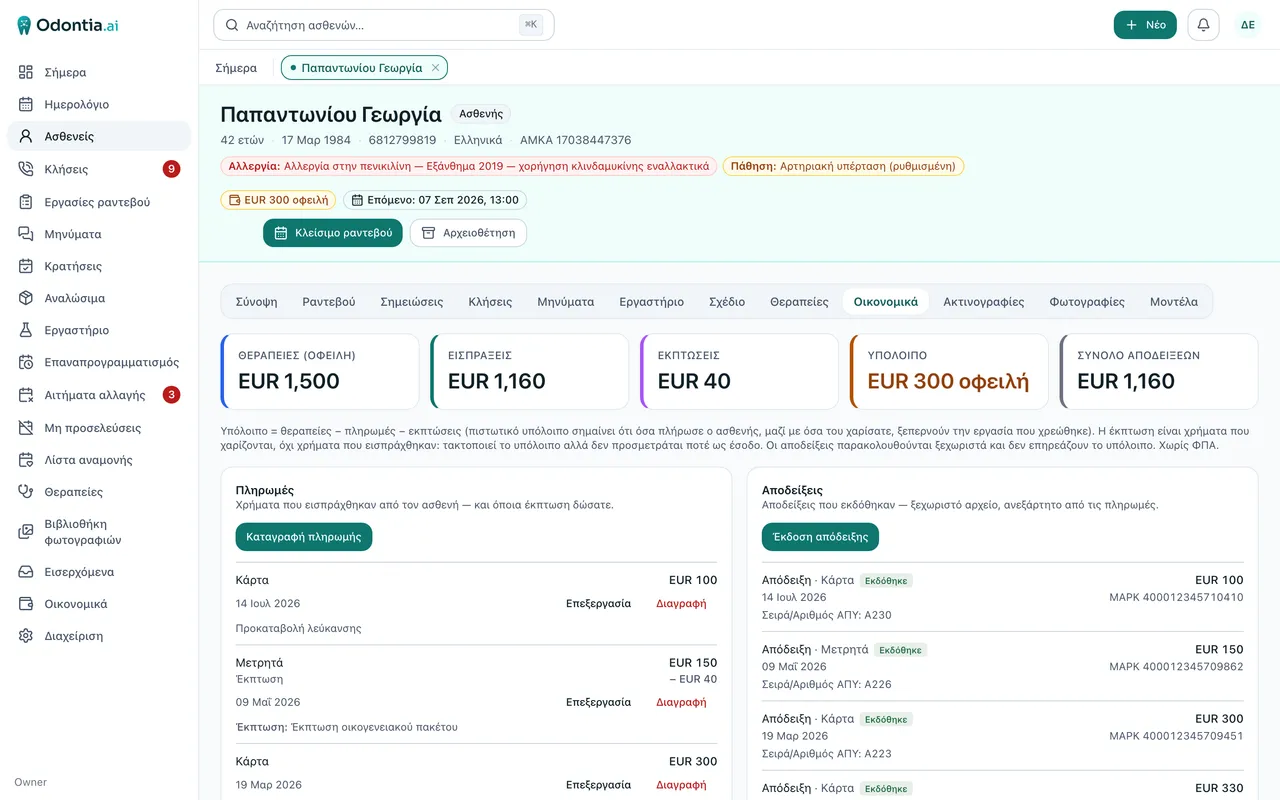
Three things most programs blur together: what is owed, what was collected, and what has been issued as a tax document. In Odontia they are three independent columns that do not pretend to be each other.
Patient ledger
Treatments owed, payments, and receipts — three separate categories, with a balance that updates in real time.
AvailableDiscounts
A discount lives on the payment, with a mandatory reason: it reduces the balance without pretending to be money collected, and it never reaches a tax document.
AvailableFinancial analysis
A daily picture for all staff, and Period / Strategy / Trends for the owner behind a PIN — broken down per practice when there are two.
AvailableReceipts in myDATA
Issue a receipt from the patient card, per establishment, with series, number and mark — and a public receipt page that goes to the patient by SMS or email.
AvailableCredit notes & cancellation
Correct a wrong document with a credit note (myDATA type 11.4), in the Greek wording and the series the accountant specified. In use at the founder’s practice, with the series each practice’s accountant specifies.
AvailableCard payments
A payment request by SMS, email or a QR code off your screen, a public payment page that lives seven days, and the balance updating itself. The request shows on the card from the moment it goes out, not when it is paid; the payment is recorded only once the provider itself confirms it.
AvailableTreasury
Sale settlements, acquiring fees, the amounts moving to your account, refunds and chargebacks from the card provider — read-only, and for the owner only.
AvailablePayment plans (expected instalments)
Changes the question from “how much do they owe?” to “are they on schedule?” — the right answer for an orthodontic practice.
ComingTalking to the patient
The same system that holds the appointment and issues the receipt sends the messages. That is why it knows what to say, to whom, and when not to say it twice.
Manual SMS & email
Send to a patient from the appointment or from their card; the channel is chosen by the person sending, at the moment of sending.
AvailableAutomatic messages
Reminders with a confirm or cancel button, a confirmation as soon as an appointment is booked, no-show follow-up, a post-op check-in and waiting-list alerts — on rules you set, in wording you write. The check-up recall is not on this list: it does not go out automatically.
AvailablePatient lists — and the recall
You name a list and put patients on it one at a time, by hand, with a note against each. Every member shows when they were last treated, with 6-month, 1-, 2- and 3-year filters. You write the message and save it on the list, and you send it. There is no bulk add, no saved filter and no automatic recall.
AvailableWho would receive this
Before the send: who will receive it, by name; who will not, and the reason for each; and what it costs. You can read it without sending anything.
AvailableEmail is a full channel
The owner sets the channel order. If the SMS provably did not go — wrong number, provider refusal — the same message is tried by email. An unknown outcome is not a failure and does not trigger a second send.
AvailablePatient portal
One link with all their upcoming appointments: confirm, request a cancellation, request a new time, and add it to their own phone calendar. Cancellations and changes are requests — the clinic decides.
AvailableMessage centre
An archive of every message the clinic sent, composition of a new one, and sending statistics for the owner.
AvailablePer-patient pause
One setting on the patient stops every automatic message, on every channel — without anyone having to remember to skip them.
AvailableLink shortening
Our own short links, so an SMS does not split into three and get charged three times.
AvailableWhatsApp & Viber
The same messages from WhatsApp or Viber as an alternative to SMS, after the compliance steps each channel requires.
ComingFiles, imaging & work lists
The heavy files — radiographs, photos, scans — live next to the patient’s structured data, not in a network folder with names only one person remembers. And the X-ray program you already own opens from the patient card, at the right patient.
Radiographs & imaging
Filed in the patient record with capture details (type, side, teeth, date) and shown beside the history. Diagnosis happens on your imaging workstation, in your device’s own software.
AvailableOpen in your own imaging software
One click from the patient card opens your X-ray program at that patient, on the computer you are sitting at. The catalog covers 24 programs — Carestream, Planmeca, CliniView, NewTom, Scanora, VixWin and others — with opening the patient’s folder as the general answer for anything not on the list.
AvailablePhotos
A tab per patient with capture category and tags, before/after comparison, a guided capture sequence, and a library across all patients.
AvailableScan files
STL, PLY or OBJ files from an intraoral scanner or CAD are stored on the patient card, alongside their other images — not in a folder one person remembers.
AvailableLab
A light coordination list for crowns, bridges, dentures and splints — both as a patient tab and as a clinic-wide list. With orders to Dentsply Sirona DS Core.
AvailableWork lists
Calls, consumables, lab, reschedules, cancellations, no-shows and the waiting list — the clinic’s loose ends in one place.
AvailableLoose ends — the staff notepad
One line of free text for the whole practice, optionally tied to a patient. No date, no assignee, no priority — which is why it gets written in two seconds. Everyone sees it and everyone can correct it; you tick it off when it is done.
AvailableCheck-ups
The same line with a date, from the patient’s card: 4, 6 or 12 months or a date you pick, with the day it lands on shown before you save. Plus a screen that lists them over any date range you ask for. Nothing is messaged from here.
AvailableManual & training
Software your staff cannot learn on their own is software you will only half use. Documentation here is not an appendix — it is written alongside the code and checked automatically on every build.
A full user manual in Greek
90 pages in 12 sections covering every screen in the product — from day one and the daily flow through to money, the phone system and settings. Written with the same button and field names the staff see.
Available«Βοήθεια» from every screen
The manual opens from inside the app, with the account the user already has. No second password, and nobody hunting for an old email with an attachment.
AvailableCoverage checked in both directions
An automated check compares the product’s screens against the manual’s pages: a screen with no page fails the build, and so does a page for a screen that does not exist. Documentation cannot quietly fall behind.
AvailableAn orthodontic edition
The same manual rewritten for an orthodontic practice — treatment stages, aligner brands and headgear instead of tooth charts and implants, exactly as the software itself switches over.
AvailableSearch, PDF and a printable file
A searchable site for the daily question, a PDF to keep downloaded, and a single file for anyone who wants it printed and left at the front desk.
AvailableRelease notes inside the app
When something changes, staff see it once inside the product — they do not have to discover it themselves or ask what moved.
AvailablePhone, AI & administration
The part no other dental program in Greece does — and underneath it, the dull but necessary: who sees what, how they get in, what is switched on.
Phone system (PBX)
A full phone system built into the record: call log, a menu in Greek and English, opening hours and holidays declared as data, voicemail, and recording of inbound calls.
AvailablePatient name on the handset
Before you pick up, the handset shows who is calling — not a number. The lookup takes about a second and, if no name is found, it simply shows the number.
AvailableCalls to handle & one-click dialling
Calls that need something go to their own list, split into “pending” and “handled”. And you call a patient by tapping their number inside the record, without typing a digit.
AvailableTranscription & call summaries
One click transcribes a call and summarises it into a draft note marked “pending” — which a person accepts or rejects. It is never written into the record on its own.
AvailableAI assistant for the staff
“What does Mr Papadopoulos owe?”, “when is his appointment?” — it answers, or opens the card. It works on the admin side, it proposes, and it never files anything. With your own key and a monthly cost ceiling in euros.
AvailableAccounts & roles
Owner, dentist, assistant, front desk — with different permissions, and adding, deactivating or resetting a password from the owner’s screen.
AvailableMulti-factor authentication
Security keys and passkeys, an authenticator app, codes by email — with “remember this device for 30 days” so it does not become a burden.
AvailableAdministration as a settings centre
17 sections in 6 groups, with search and an “On / Off / Needs setup” marker on every card — so you can see what is actually switched on.
AvailableLanguages
The staff app is bilingual (Greek and English) and each user picks their own. The pages a patient sees exist in Greek, English, German and French.
AvailableThe real screens
Every other picture on this site is a drawing, on purpose. These are the program itself.
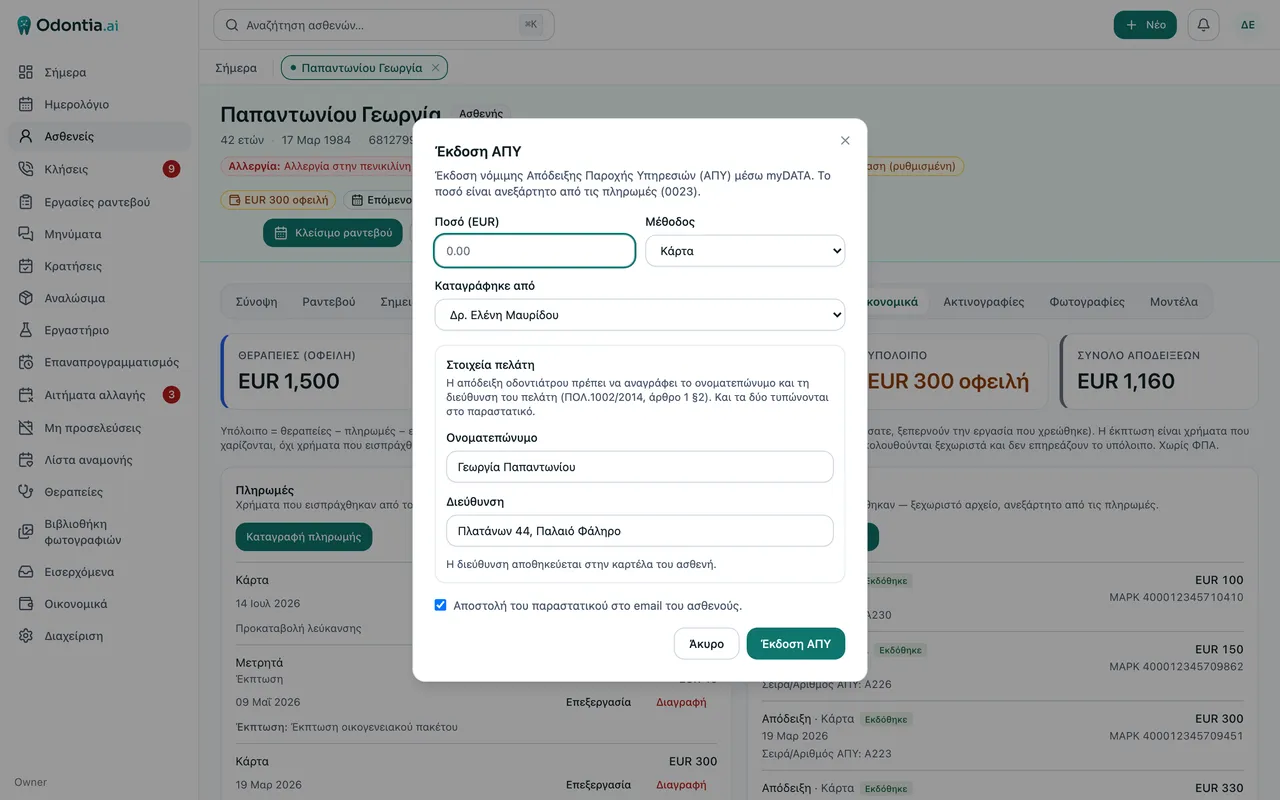
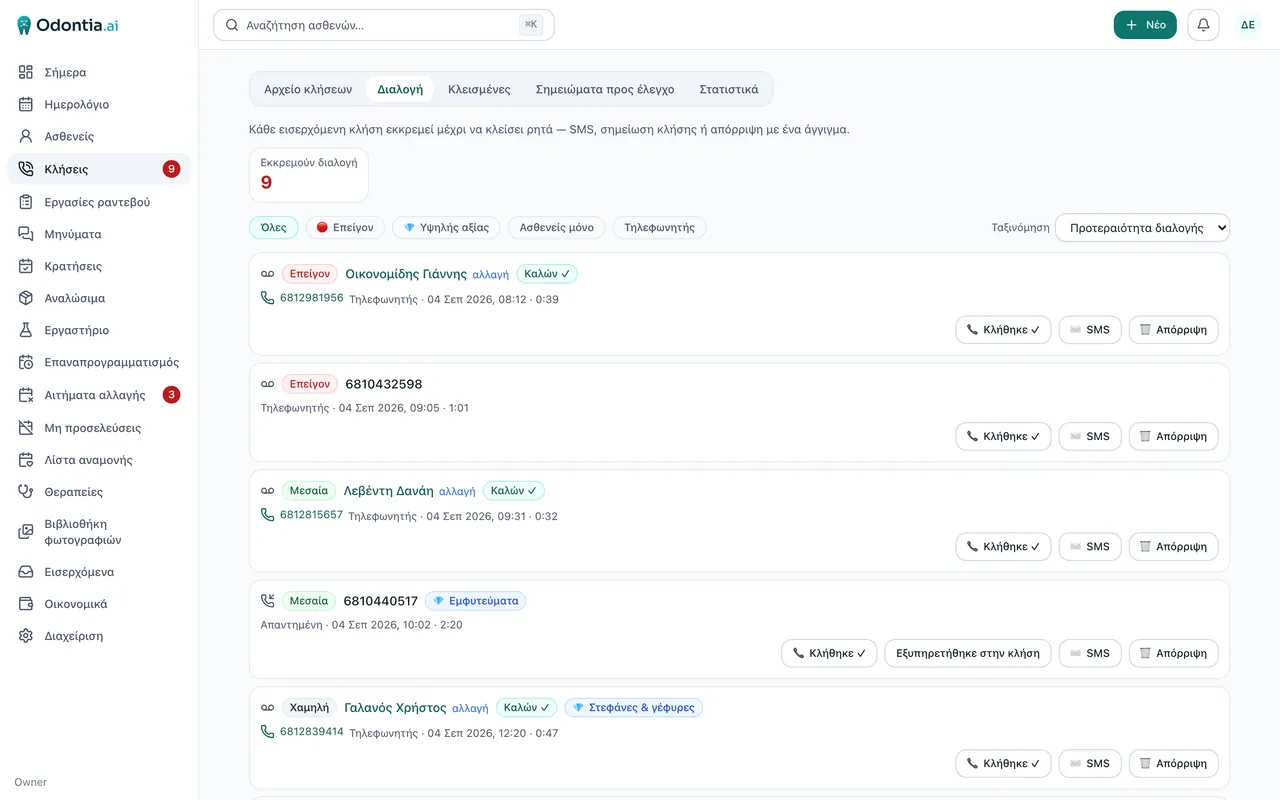
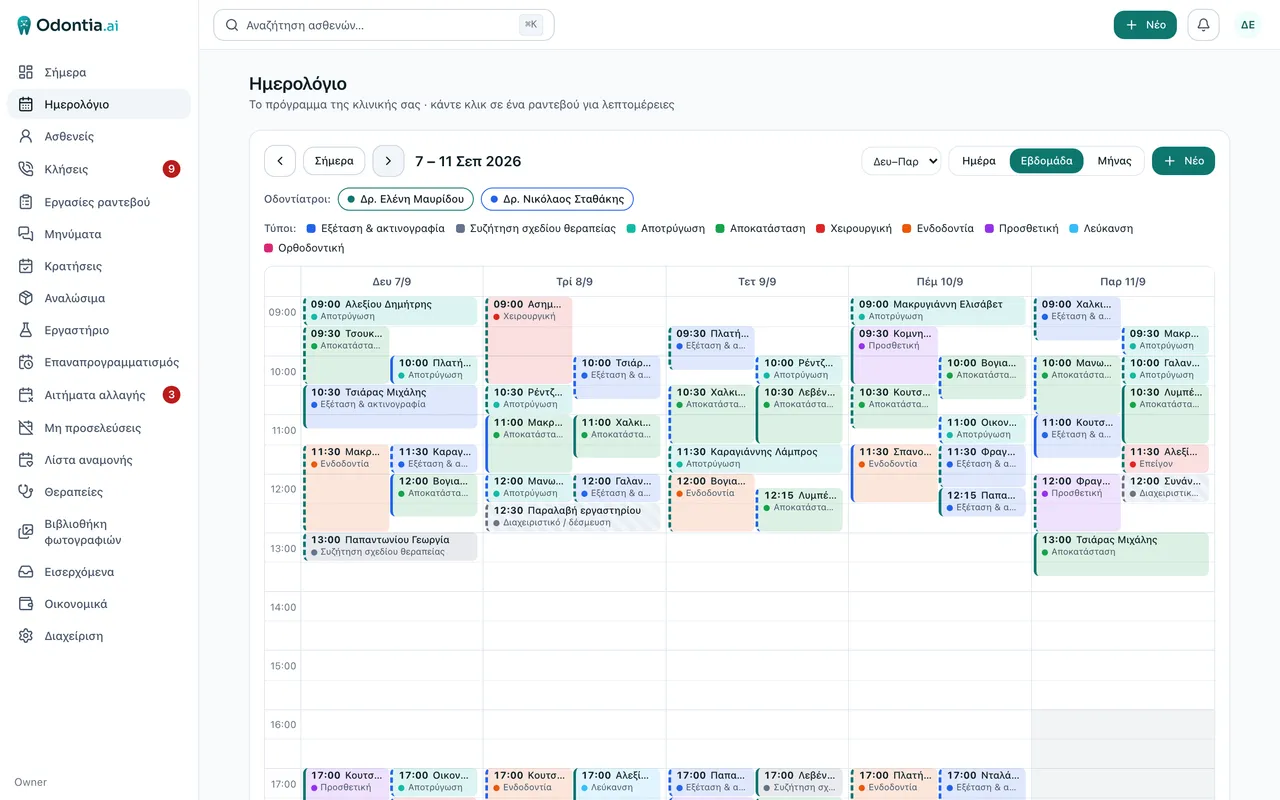
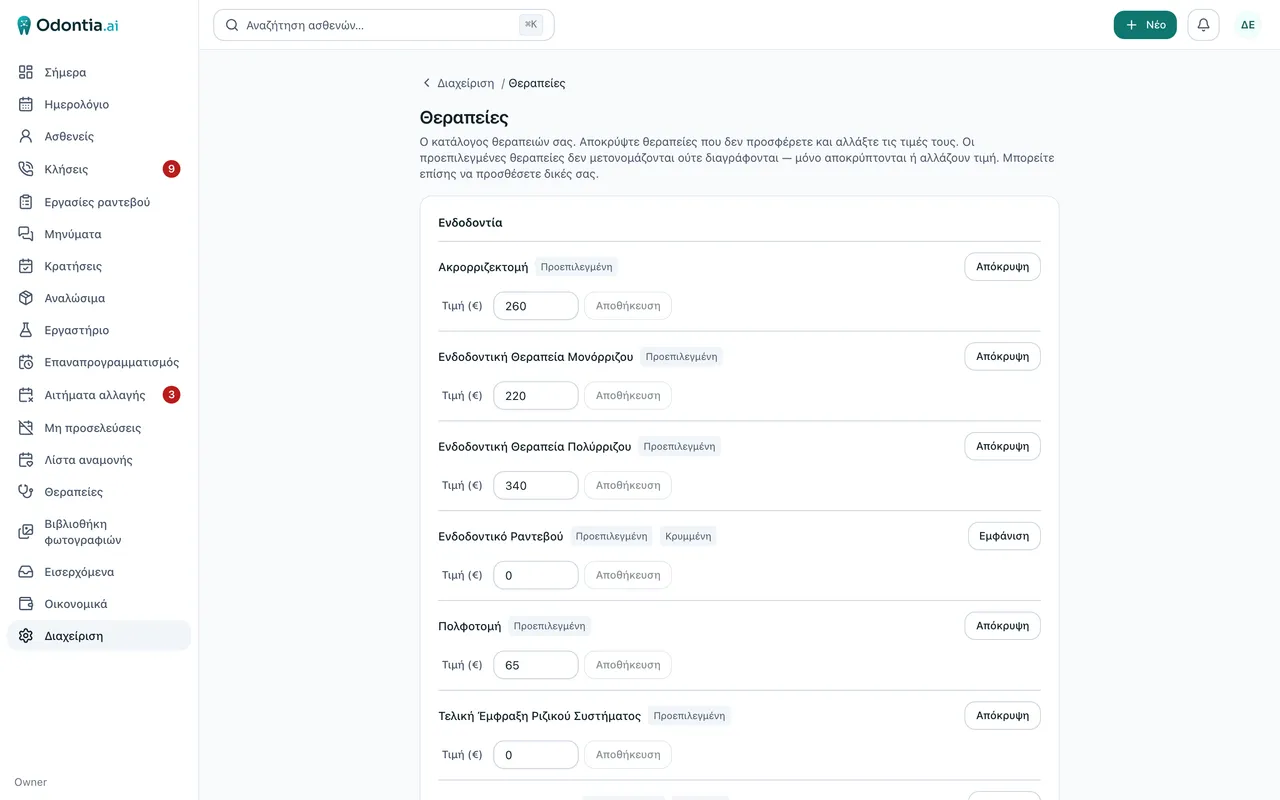
The same screen, three devices
The “Today” screen — the one you open in the morning — works on the computer, on the tablet and on the phone.
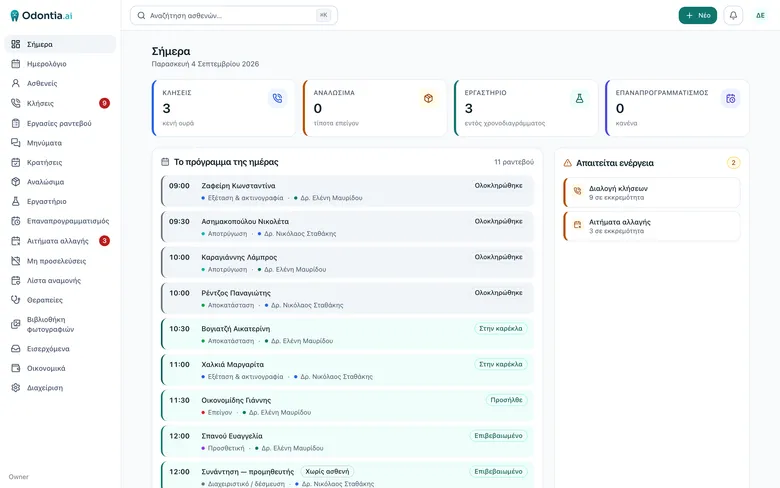
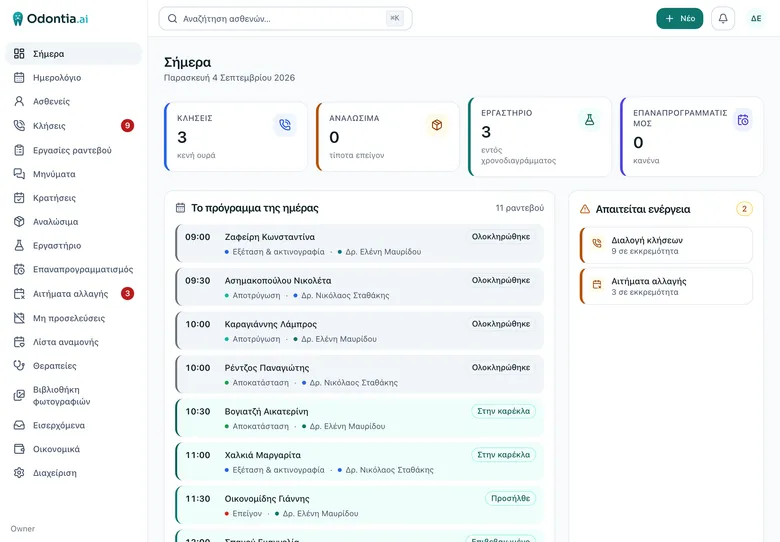
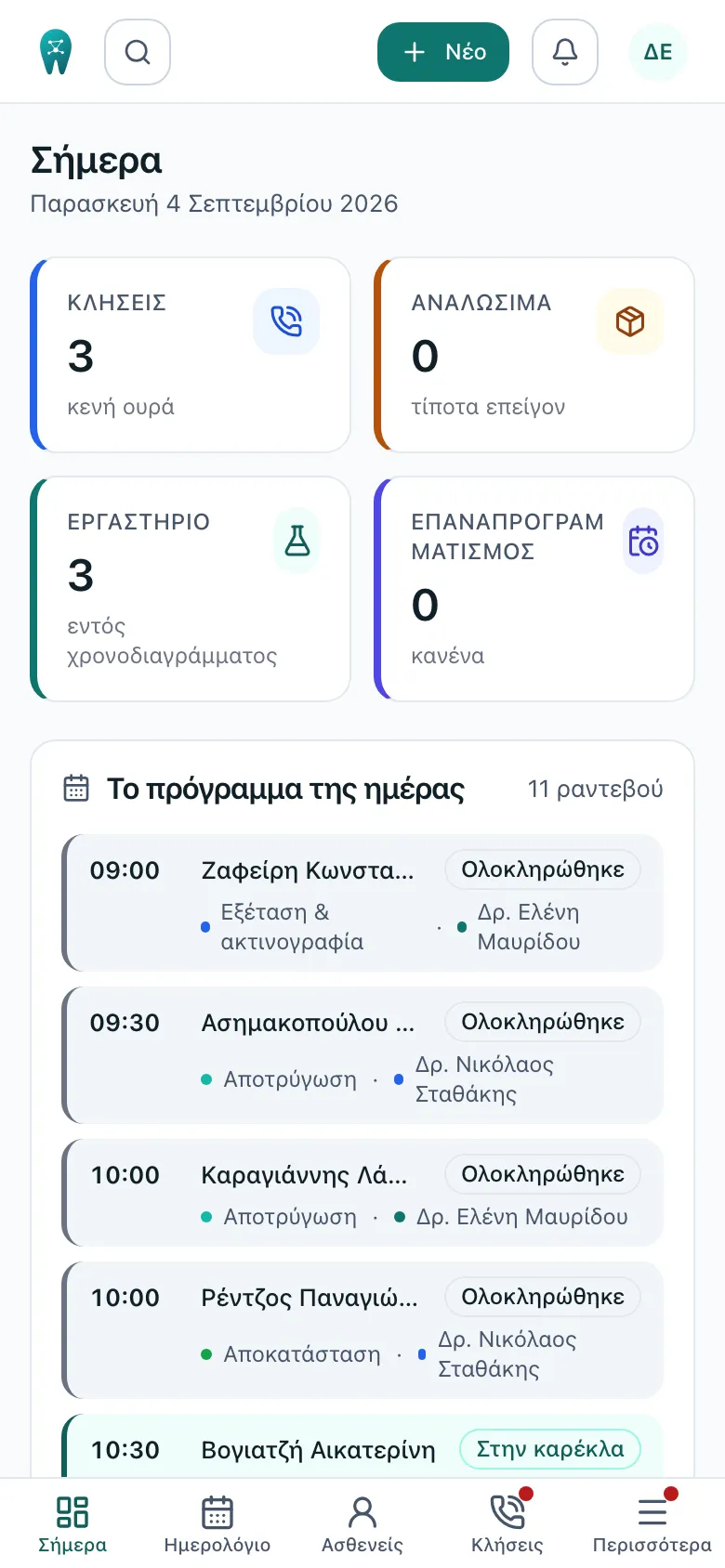
Captured on 4 September 2026 from two demo practices, one general and one orthodontic, with invented patients and invented details. No real patient record was ever photographed.
Orthodontic mode
An orthodontic practice does not work like a general one. So Odontia has a switch: in orthodontic mode the odontogram, treatment plans, cases and implants leave the screen, and in their place comes an orthodontic catalog organised by treatment stage, with aligner brands and headgear types.
This is not “hiding menus”. It is a different vocabulary for a different job, and it is worked every day in a real orthodontic practice.
The switch reaches all the way to the front door: the public intake form asks orthodontic questions — the seven an orthodontist asks, rather than a general practice’s condition checklist.
What is coming
Whatever gets built, gets built because somebody who works with it daily asked for it.
Payment plans (expected instalments)
Changes the question from “how much do they owe?” to “are they on schedule?” — the right answer for an orthodontic practice.
Treatment type & stage labels
What the patient bought (Full, Phase I, Phase II, Aligners) and where they are — not started, in treatment, in review, discharged.
Opening hours per practice
Each practice with its own hours, so the calendar and online booking never offer a closed slot.
Notice after moving an appointment
When you drag an appointment, being offered the patient notification instead of remembering it yourself.
WhatsApp & Viber
The same messages from there too, after the compliance steps.
Assistant with dictation
Voice instead of a keyboard — through the same proposal gate, with no automatic filing.
Every number on this site is measured by the system itself, carrying its date and the practice it counts. No estimates.
A closer look
The parts that deserve a page of their own.
THE PHONE
No lost calls
Our own phone system, the patient’s name on the handset before you pick up, and every call as a line in the record. 800 to 900 calls a month, measured.
Read more →FOR ORTHODONTISTS
Orthodontic mode
One switch, and the program speaks the orthodontist’s language: treatment stages, aligners, headgear, families with a separate payer — and a manual rewritten for you.
Read more →MONEY
Receipts from the patient card
A legal receipt with series, number and myDATA mark without a second program, card payment from the patient’s phone, and a credit note when a correction is needed.
Read more →COMMUNICATION
The patient who does the work
Reminders that go out on their own, one link instead of five phone calls, and an intake form that changes with the practice — and ends the copying by hand.
Read more →MIGRATION
Without losing your past
We have a fully capable importer, and we import from other programs too: send us your database and we do it. Patients, appointments, treatments, money, history, photos, settings — with every patient’s balance reconciling to the cent.
Read more →ARTIFICIAL INTELLIGENCE
It proposes; it does not decide
What the AI does inside the practice today, where it stops, and why every proposal it makes waits for a person.
Read more →INTEGRATIONS
What it connects to
myDATA, cards, SMS, email, telephony, imaging, the lab, the scanner. And in every case, with your own account at each provider.
Read more →HOW A PRACTICE GETS IN
Would you like to see it?
A short tour of the real system, with no commitment at all — and, if you like, a test practice with your own data sitting quietly to one side.
- 1 A short tour of the real system
- 2 A test practice with your own data
- 3 Signatures before the first patient goes in