
Odontia
CLOSED BETA

DENTAL PRACTICE SOFTWARE · BUILT FOR GREEK CLINICS

Your whole practice feeds one mind.

Odontia gathers phone calls, appointments, the clinical record, treatments, payments and myDATA receipts into one calm, structured system that runs in the browser. Written by a dentist, inside a working practice.

Running today in Greek practices with real patients, as their only system, carrying their phone lines every day. We take new clinics on one at a time, by invitation.

Orthodontic An orthodontic practice? There is a mode for that. The page for orthodontists →

The problem

Everything you need to know already happened. Nobody wrote it down.

Before any feature list: this is what does not work in a dental practice today. We know because it is what did not work in ours.

  • The phone is the busiest part of the practice, and the least recorded

    Somebody rings about pain, about a price, to move an appointment. The call is handled well — and then it is gone. Nothing reaches the patient’s record, and a week later nobody remembers who asked for what.

  • The information exists, in pieces, and you cannot ask it anything

    Half in a program, half in a notebook, the rest on somebody’s phone. To answer “what happened with this patient?” someone has to remember, and remembering is not a system.

  • You find out what is happening in your own practice by asking people

    How many calls went unanswered yesterday? Who has not been in for two years and still owes money? In most practices the only way to know is to ask somebody to go and count.

So it was built the other way round

Odontia is not a program you type yesterday into. Every way information arrives — the phone, the intake form, the chair, the lab, the payment — is a way in, and it all lands in one structured database. Because it is one, artificial intelligence can read across the whole practice: it listens to the calls, writes what each one was about, and puts that on the patient’s record for a person to approve. Nothing is written on its own.

See it

This is what it actually looks like

Five screens from the real program. The patients and the details in them are invented; the software is not.

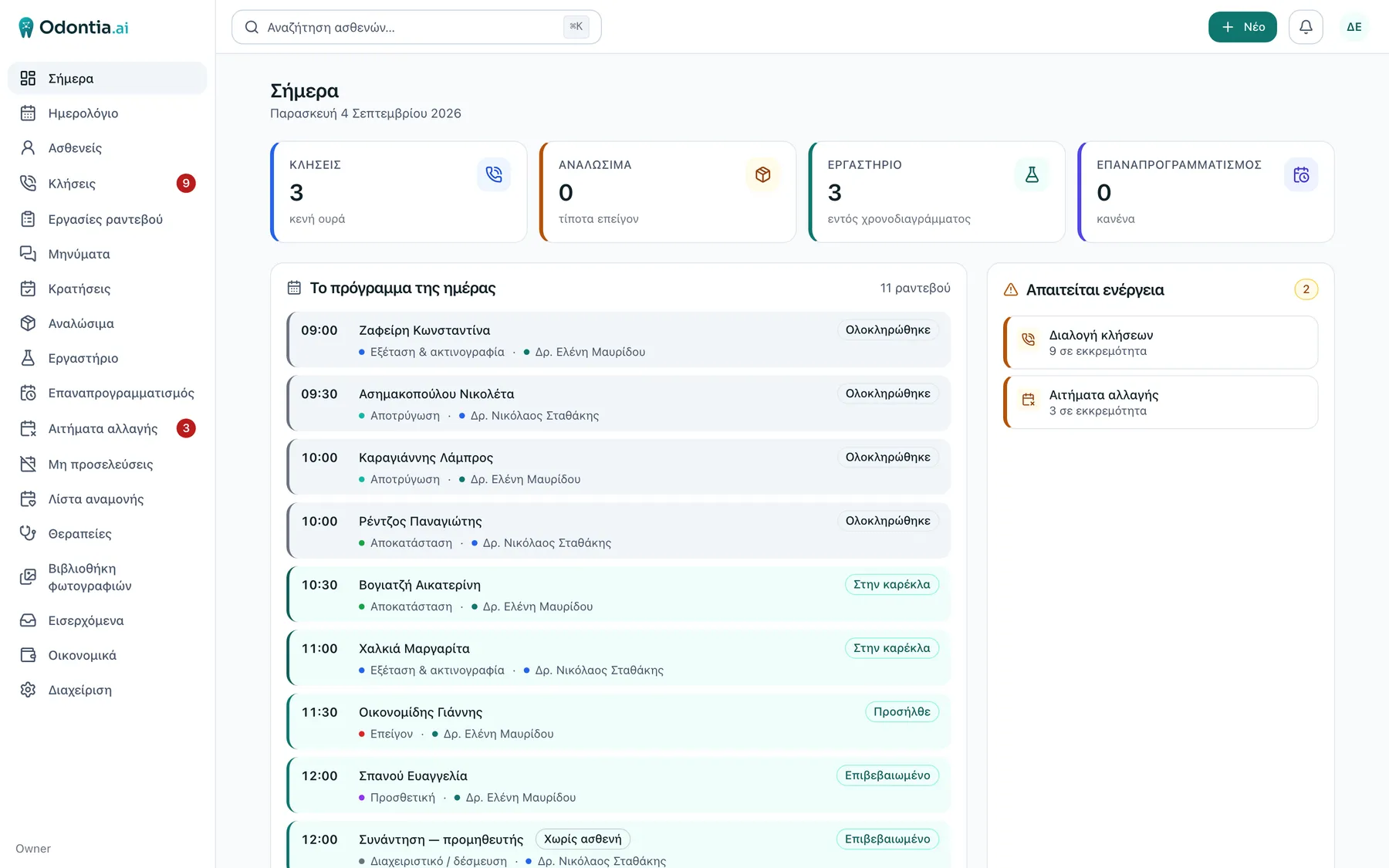
Your morning
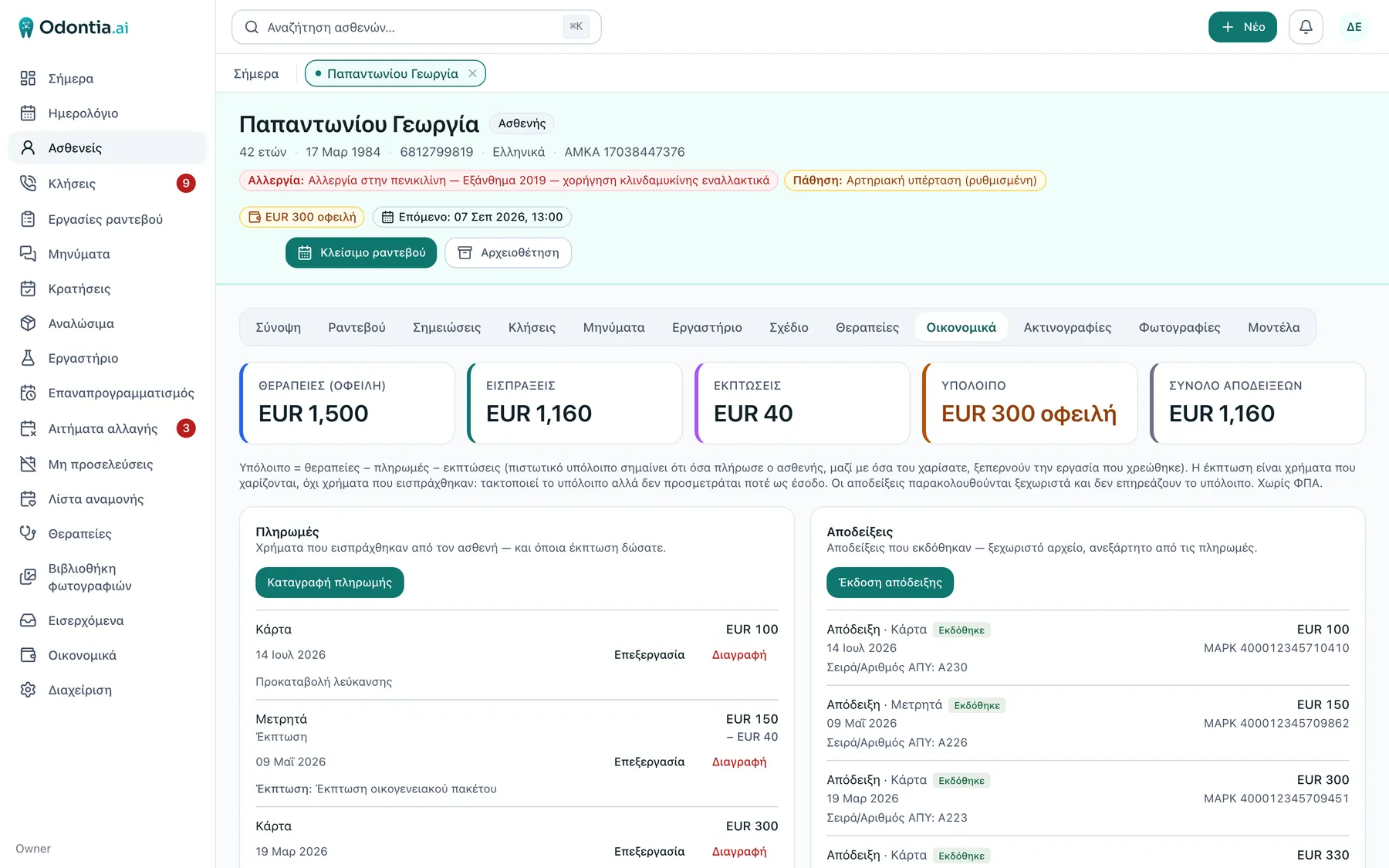
Who is in the chair, who is next, and what is waiting on a decision. The screen a practice opens first.
Your morning Who is in the chair, who is next, and what is waiting on a decision. The screen a practice opens first.
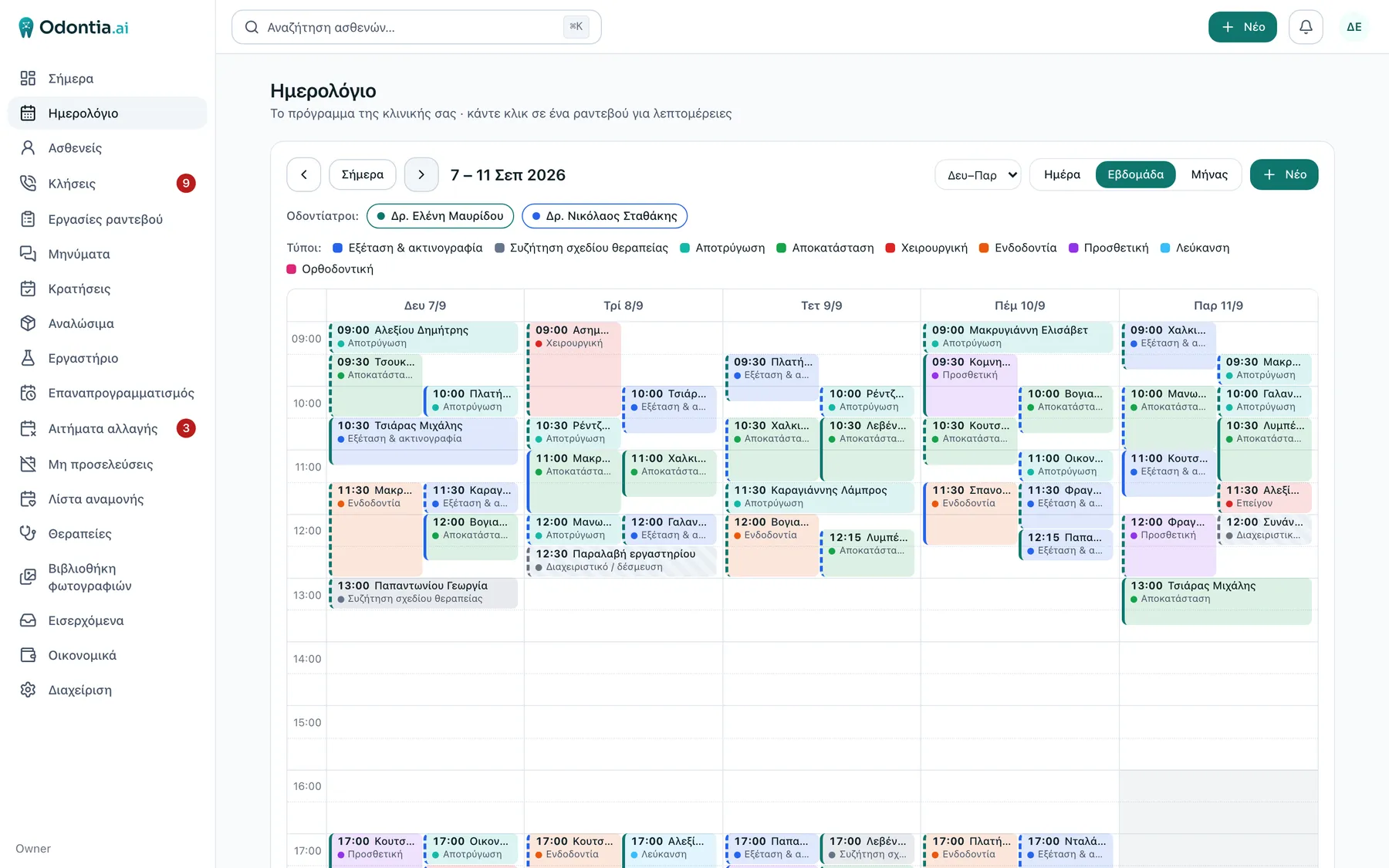
The week
A whole week on two chairs, dentist by dentist. Appointments are booked and moved here — and each dentist’s own diary can show up in the calendar they already look at.
The week A whole week on two chairs, dentist by dentist. Appointments are booked and moved here — and each dentist’s own diary can show up in the calendar they already look at.
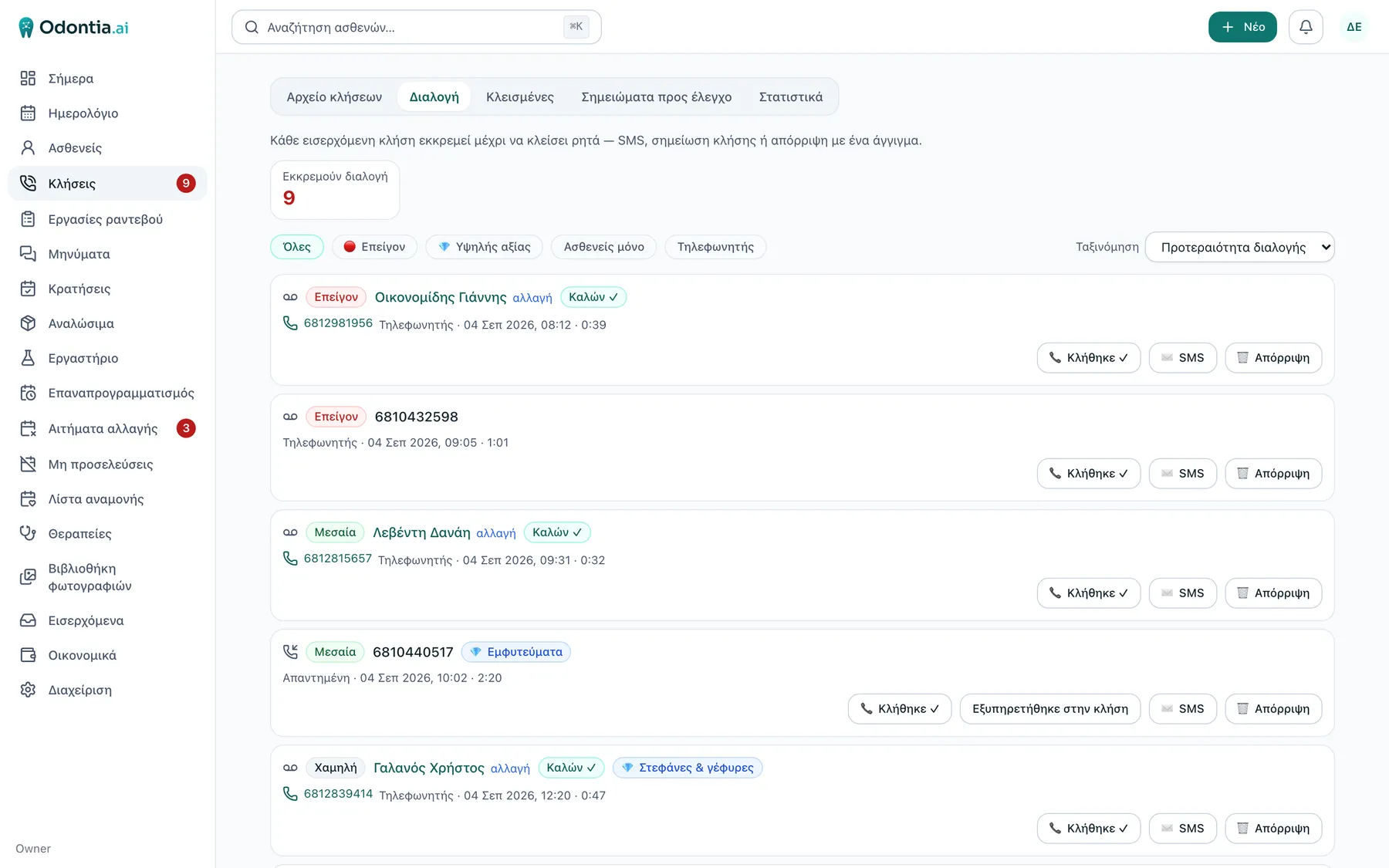
Every call that asked for something
Every call that asked for something, ranked and waiting: who rang, and what happened to it. One click turns a call into text with a summary. A person closes each line.
Every call that asked for something Every call that asked for something, ranked and waiting: who rang, and what happened to it. One click turns a call into text with a summary. A person closes each line.
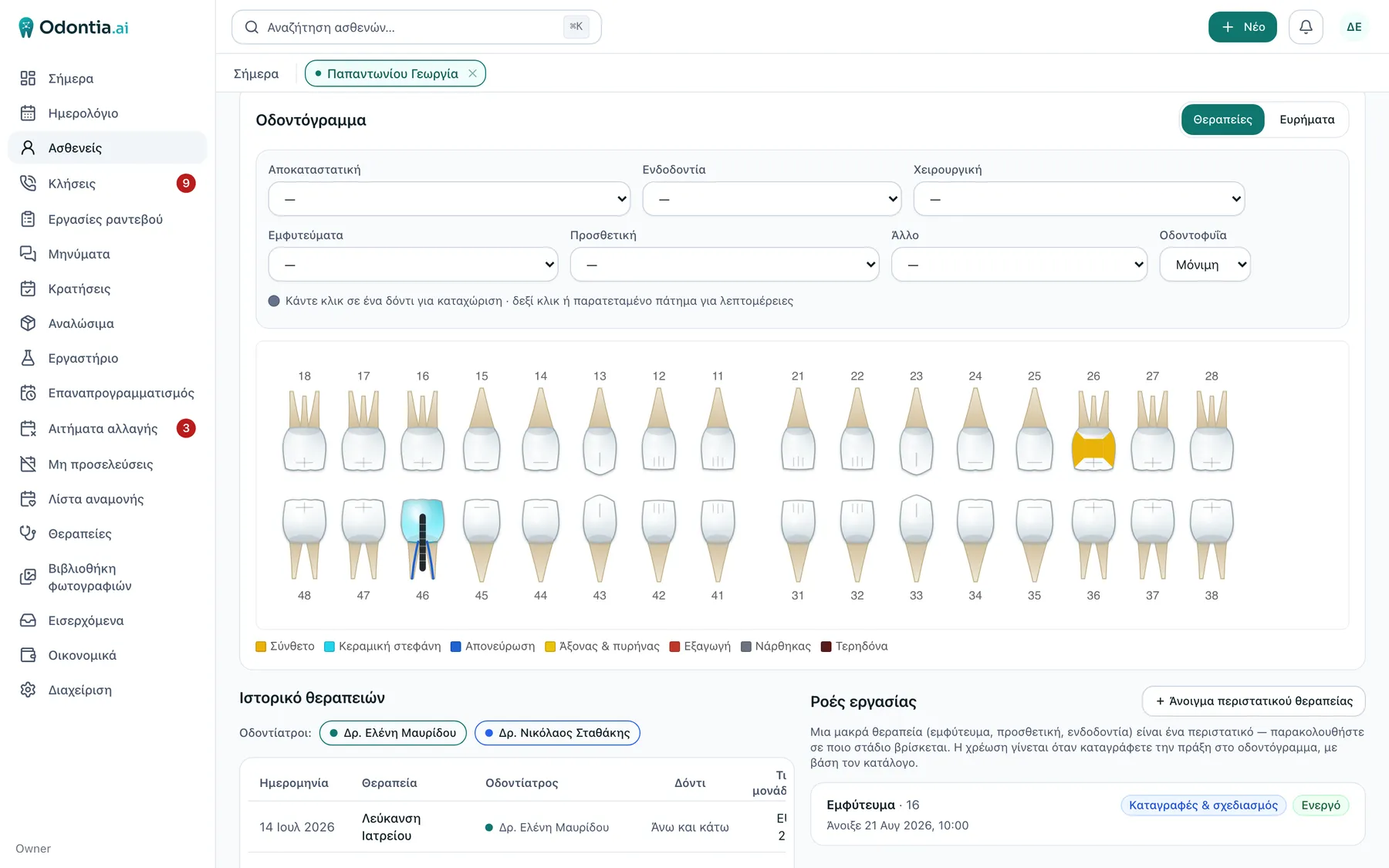
The clinical record
Click a tooth and the chart records what was done — per tooth, per surface, linked to the treatment and to its cost.
The clinical record Click a tooth and the chart records what was done — per tooth, per surface, linked to the treatment and to its cost.
The patient’s money
Charged, paid, discount, balance — and the receipts with their myDATA MARK, on the card itself.
The patient’s money Charged, paid, discount, balance — and the receipts with their myDATA MARK, on the card itself.

Captured on 4 September 2026 from two demo practices, with invented patients and invented details. No real patient record was ever photographed.

All the screens, and the full feature list

Measured, not promised

In production since June, every day, in real practices

The only system the practices on it use, with real patients — and with their entire phone line running through it. If it stopped, they would know within minutes: the phone would stop ringing.

1,940
calls through the system — 883 in the last 30 days

04.09.2026 · all practices in production, since late June

653
calls transcribed on demand, 575 with a summary

21.08.2026 · founder’s practice

131
legal receipts with a myDATA mark, from the patient card

21.08.2026 · founder’s practice, 12.07–19.08

834
SMS and emails to patients, 691 of them automatic

21.08.2026 · both practices, since 21.06

May 2026
the first line of code
164
ratified design decisions, written before they became code
550
automated test files that run on every change

Measured by the system itself in production, not estimated. Calls and receipts are from the founder’s own practice; the messages cover the practices that were on Odontia at the time. Calls were measured on 4 September 2026; the other figures on 21 August 2026.

THE BASICS

Fast. Everywhere. Always current.

Much faster. On a reliable, stable base.

Every screen opens at once and does not weigh on the computer. Underneath, one stable database with encrypted backups every four hours — and very soon on managed Postgres, where the provider keeps continuous backups and can restore the database to any moment needed.

Works on what you already have

A computer, an iPad at the chair, a phone on the road. Same app, same data. Your whole practice in your pocket.

Nothing to install

It opens in the browser and is always the latest version. New capability arrives continuously.

Your data, in Europe

Records and finances live on European servers — production is in France — with backups and tested restores.

X-rays deliberately stay on your own machine or NAS; Odontia opens them from there. Your images remain yours.

UNDER THE HOOD

Built like a modern system, not a program from 2005

The same tools that run the largest applications in the world — at the size of a practice.

  • PostgreSQL

    one structured database for everything, with per-clinic isolation enforced inside the database itself — and very soon on managed Postgres: continuous backups and upgrades by the provider, with nobody having to remember them

  • TypeScript, end to end

    one language and one type system from the browser to the server — fewer places for a mistake

  • A web application

    React in your browser; no install, no upgrades, the same on a computer, an iPad and a phone

  • Passkeys & security keys

    password-less sign-in where possible, and passwords kept only as an Argon2 fingerprint

  • European hosting

    France for production, the Netherlands for the encrypted backups — every four hours

  • Claude Sonnet 5

    Anthropic’s model for summaries and the assistant, always behind a person’s approval

  • 550 automated test files

    run on every change; measured on 21.08.2026

  • Written with Claude Code & Codex

    on Claude Opus 5 and Claude Fable — which is why new capability lands every week

THE PHONE · HOW IT WORKS

The phone rings. Nobody writes anything down.

This is how a call travels through the founder’s own practice on Paros, every day. You change nothing with your telecom provider, your number or your handsets.

The journey of one call, in six steps

  1. 01 the patient

    The patient calls the number they know

    The same number the practice has had for years.

  2. 02 your provider

    The line is diverted to Odontia

    A plain call diversion at your provider. Contract, carrier and handsets stay as they are.

  3. 03 Odontia

    Odontia answers and routes

    The patient’s name on the handset before you pick up. Menus with AI voices, opening hours, voicemail.

  4. 04 AI

    Transcribed and summarised

    One click on a call or a voicemail, and it comes back as text with a summary. That summary waits as a Proposal.

  5. 05 a person

    It lands on the patient’s record

    One tap by a person, and the summary becomes a line in the record.

  6. 06 the front desk

    The staff see it

    Who called, what they wanted, what happened. Calls that need action go to their own list.

And when you call out

Tap the number inside the patient card. The patient sees your practice’s number — not an unknown one.

The diversion is set up with you when the practice is opened. Incoming calls are recorded and the caller is told before recording starts.

The phone, up close→

Your own number

The practice is reachable at any hour. You are not.

Most dentists end up giving patients their personal mobile. It is the only way to be reachable when something actually matters — and then it never stops. Evenings, Sundays, the middle of a holiday, for something that could have waited until Tuesday. Once a private number is out, it does not come back.

Odontia puts the practice’s own number in between. A patient who rings at eleven at night reaches something: the greeting, the menu in Greek or English, or the voicemail. Opening hours and closure periods are declared once in the system’s calendar and hold by themselves, so nobody has to remember to change the greeting before going away.

  • One click, and you read it instead of hearing it

    A click on the voicemail turns it into text with a summary, opened from the call list. You see what the patient wanted without playing the message back — and without a name being said out loud in a room with other people in it.

  • You are told it is there

    A voicemail emails the staff, each person in their own language — the one notification that is on from the start. The email says a message is waiting, not what is in it: the message itself never leaves the program.

  • And your mobile stays yours

    Call back from inside the patient card and the number the patient sees is the practice’s. The way into the clinic stays open; your private number is not part of it.

260 voicemails in the founder’s practice by 21 August 2026, none of them outside the record. What the machine writes is marked as its work and waits for a person to put it on the patient’s record — a summary is never filed on its own.

WHAT IT DOES

Six things that make the difference day to day

E-INVOICING

Available

Receipts from the patient card. No second program.

E-invoicing is built in, through Wrapp — a licensed Greek fiscal provider. Series, number and mark come from myDATA.

  • A person types the amount; no receipt is ever issued automatically
  • Credit notes for corrections
  • Card payment by link or QR

COMMUNICATION

Available

The patient is served on their own

Reminders go out on their own, on rules you set. The patient picks a time from the ones you offer, and cancels from the same link.

  • A reminder with a confirm button
  • Booking from a link, at the times you chose
  • One link for all their appointments

THE INTAKE FORM

Available

The intake form changes with the practice

A new patient fills in details, history, consents and a signature from their phone before they even sit down — in four languages. And it is not one form for everybody: a general dental practice and an orthodontic practice do not ask the same things, so they do not ask the same things.

  • An orthodontic version with an orthodontist’s questions
  • A QR code at the desk, or an address of your own with your logo
  • Whatever the patient sends waits for a person to approve it

IMAGING & FILES

Available

Images stay with the patient

Photos, radiographs and scan files attach to the person, not to a folder on the network. And the X-ray software you already own opens from the card, in one click.

  • Opens Carestream on the right patient
  • Built multi-vendor; more coming
  • X-rays stay on your own machine

Several practices

Available

Two or more practices, one system

Every patient belongs to a home practice, every practice has its own calendar, and the receipt is issued at the right establishment — because e-invoicing is embedded in that structure, not bolted on. Statistics split per practice.

  • A separate calendar per practice
  • The receipt at the right establishment, automatically
  • One patient record, wherever you see them

THE LAB

Available

Every lab case, where it belongs

Crowns, bridges, splints: one list per patient and one for the whole clinic. With orders to Dentsply Sirona DS Core.

  • As a patient tab and as a clinic list
  • DS Core orders
  • Several practices, one system

CALENDAR SYNC

Available

Your day, on your own phone

Each dentist sees their own appointments inside the calendar they already look at — Google Calendar, Apple Calendar or Outlook. You set it up once by copying a link, and from then on it keeps itself up to date.

  • Your own appointments, across all your practices
  • Your own link — you switch it on, you revoke it
  • The same link on your phone and on your desktop

One way: from Odontia into your calendar. Whatever you do inside Google, Apple or Outlook does not come back to Odontia — appointments are always booked and moved here.

The link shows patient names, so it is treated like a password. The sync starts switched off and each person switches on their own.

ARTIFICIAL INTELLIGENCE

A proper database underneath. AI that can read all of it.

We did not add AI to a program. Odontia was built the other way round: one structured database a model can read across — the calls, the record, the appointments, the money. That is why it can listen to the phone and write what a call was about, and answer a question about a patient in your own words. Everything it produces is marked as its work and waits for a person to approve it. Nothing reaches the record on its own.

  • Any call, summarised onto the record

    One click transcribes and summarises a call or a voicemail; the summary waits for approval.

  • An assistant for the staff

    “When is Mr A.’s next appointment?” — it answers or opens the card. It suggests; it never writes.

  • AI voices on the phone

    Menus and a welcome message you build in minutes, with no recording session.

Inside Odontia runs Claude Sonnet 5
Anthropic’s model reads the calls, writes the summaries, answers the staff and speaks on the phone. Whatever it suggests, a person approves.
And Odontia itself is written with the power of AI
Its code is written with Claude Code and Codex, on the strongest models of the moment — Claude Opus 5 and Claude Fable. That is why new capability lands every week, not every year.

Where each step runs

  1. 01

    The audio and the transcript

    On our own infrastructure in Europe, with a European speech-recognition provider. Your patients’ recordings do not go to an American speech service — we ruled that out at the design stage, not afterwards.

  2. 02

    The language model

    Claude Sonnet 5 writes the summary from the text, under a processing agreement with no retention and no training. The sub-processor register is by name, and you get it before you sign.

  3. 03

    And then it deletes

    Audio is deleted automatically at 30 days, the transcript at 180. Whatever the machine writes is marked as such, on screen and in the data.

You say what gets built next

New capability lands continuously. The practices using it suggest what follows — and we listen.

A person always has the last word

Nothing is written automatically into the clinical record, the calendar or the finances — not by a form, not by voice, not by AI. Whatever the system prepares appears as a Proposal, and a person carries it out with one tap.

AI call summary Patient intake form AI assistant Migrated history produces Proposal pending reads it A person accepts or rejects only then is it written The patient record calendar · finances no automatic entry — ever
Anything the machine prepares stops at a Proposal. The direct path into the record does not exist.

ASK THE MANUAL

It is a big program. You will not get lost.

A complete program has many settings. So an assistant reads the whole manual and answers whatever you ask, in your own words.

90 pages
of user manual, entirely in Greek
12 sections
from day one through settings and the phone system

The manual opens from inside the app with a staff account; it is not a public page. Figures measured on 24 August 2026.

Illustration. The assistant opens inside the app, with a staff account.

HOW IT WORKS

One day, from the phone call to the receipt

Every step leaves something structured behind — and the next step uses it. That is the whole difference from six separate tools.

  1. 01

    The phone call

    Available

    The phone rings and the handset shows the patient’s name, before you even pick up.

    leaves: a line in the record

  2. 02

    The intake form

    A new patient fills in details and history from their own phone, before they even sit down.

    leaves: a Proposal to approve

  3. 03

    The appointment

    Booked in the calendar, or by the patient themselves from a link with the times you chose.

    leaves: a confirmation and a reminder

  4. 04

    The treatment

    The dentist records what was done, per tooth and per surface, with price and arch.

    leaves: a charge on the ledger

  5. 05

    The payment

    Cash at the desk, or card through a link and QR on the patient’s phone.

    leaves: an updated balance

  6. 06

    The receipt

    Available

    Issued from the patient card, with the amount typed by a person and series, number and mark from myDATA.

    leaves: a receipt link for the patient

WHAT IT DOES

The whole clinic workflow, in one system

From the first call to the receipt — structured, linked and searchable. See the full list, with an honest marker on what works today and what does not.

  1. 01

    Patients & the clinical record

    The record is structured data — things that can be searched, summed and linked to each other — not free-text notes nobody can find again.

    10 capabilities
  2. 02

    Appointments & patient flow

    The calendar is one part. The other is everything hanging around it: who asked to move, who did not show, who is waiting for a cancellation, who called and got no answer.

    11 capabilities
  3. 03

    Money

    Three things most programs blur together: what is owed, what was collected, and what has been issued as a tax document. In Odontia they are three independent columns that do not pretend to be each other.

    8 capabilities
  4. 04

    Talking to the patient

    The same system that holds the appointment and issues the receipt sends the messages. That is why it knows what to say, to whom, and when not to say it twice.

    10 capabilities
  5. 05

    Files, imaging & work lists

    The heavy files — radiographs, photos, scans — live next to the patient’s structured data, not in a network folder with names only one person remembers. And the X-ray program you already own opens from the patient card, at the right patient.

    8 capabilities
  6. 06

    Manual & training

    Software your staff cannot learn on their own is software you will only half use. Documentation here is not an appendix — it is written alongside the code and checked automatically on every build.

    6 capabilities
  7. 07

    Phone, AI & administration

    The part no other dental program in Greece does — and underneath it, the dull but necessary: who sees what, how they get in, what is switched on.

    9 capabilities
AvailableComingOrthodontic 62 capabilities

COMING NEXT

Coming

We say it plainly, so you do not discover it yourself.

Designed, not yet open

  • Electronic prescriptions

    Being implemented now, from the patient card; licensing is in progress.

  • More scanners and labs

    No names and no dates before they work.

  • WhatsApp & Viber

    The same messages from there too, after the compliance steps.

Before you say yes

The hard questions, answered

What happens to your history, who can see your patients’ data, what happens if we disappear, what it costs. Written answers, without the runaround.

Will I lose my history?

No. We have a fully capable importer, and we import from other programs too: send us your database and we do it. Patients, appointments, treatments, finances, history, photos and your settings come across — with your own treatment catalog untouched, and every patient’s balance reconciling to the cent with the old system.

Can I issue a legal receipt from inside the program?

Yes. The receipt is issued through a licensed e-invoicing provider under your own credentials, and takes its series, number and mark from myDATA. A person types the amount — no receipt is issued automatically.

Will my staff have to learn a new vocabulary?

No. Your treatment catalog comes across as it is — same names, same prices. And the app is in Greek or English, chosen by each user.

Does it work if I have two practices?

Yes, and it is one of the parts tested first: every appointment knows where it happens, every patient has a home practice, the statistics split per practice, and the receipt is issued at the right establishment.

Who can see my patients’ data?

The users you create, with the role you give them. Per-clinic isolation is enforced inside the database itself and is checked on every build by a test suite that deliberately tries to break it. Every access to a record is logged.

What happens to the calls we miss?

They land in the record like everything else. Answered, missed, voicemail and outbound — each with direction, outcome, duration and a link to the patient. The ones that need action go to their own list.

Who is behind this, and what if they walk away?

A dentist on Paros who uses it every day in his own practice. Your accounts with the providers — SMS, e-invoicing, cards — are yours and do not run through us. What happens to the data at the end of the relationship is set out in the data-processing agreement we sign before the first patient record goes in, and you read it before you say yes.

What does it cost?

We have not announced pricing. We are still in a closed phase, where the practices using it do not pay — precisely so the painful spots show up in real use. When there are prices, they will be written here, plainly, before we ask anyone to pay.

OUR PRINCIPLES

Three principles, in priority order

  1. 01

    Simplicity

    Fewer moving parts, always. Odontia is deliberately simple — the opposite of the heavy systems built for large organisations, which a small practice pays for every day in time and irritation.

  2. 02

    Reliability

    Patient and money data are sacred. Tested restores, correct receipts, and a design where a failure shows itself instead of passing in silence.

  3. 03

    Flexibility

    Build once, never rebuild. Every new capability is added on top of the same structure — it does not require rewriting what is already there.

“I wanted the software I would want for my own practice: simple, reliable, and respectful of my patients’ data. Since it did not exist, I built it.”
Emmanouil Kritikos · Dentist & founder

One honest note

Odontia is new. It is proven in a handful of practices, not two hundred, and we open each new clinic together, with its own credentials at its own providers.

We will not tell you it is ready for everything. We will tell you that the person writing it trusts it with his own patients, his own phone line and his own tax documents, every day.

HOW A PRACTICE GETS IN

There is no sign-up button. By design.

We take practices one at a time, from the list. The founder works with each one, sets it up properly, and adapts the product to how it actually works.

Join the list→ We take practices on one at a time, by invitation.
  1. 1 A short tour of the real system
  2. 2 A test practice with your own data
  3. 3 Signatures before the first patient goes in